


There are two different ways to redeem store credit and gift cards for payments and purchases.
At Cart Checkout:
1. Go to View Cart after you add a product to the cart
2. Click on the Store Credit you want to use
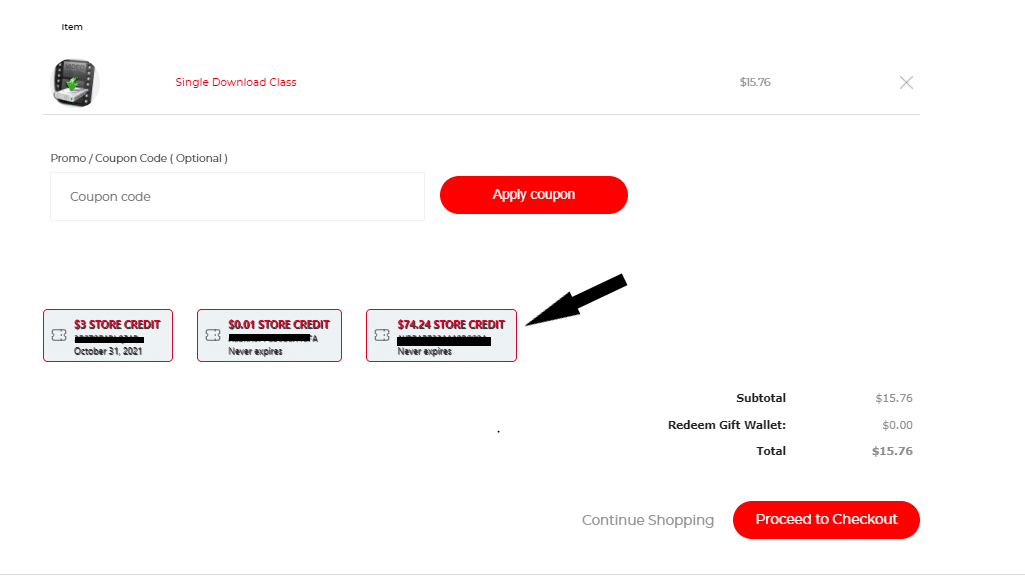
3. Click Proceed to Checkout and the Gift Card amount will be implemented.
Add it to your Gift Wallet (a great option if you want to use it for subscription renewals):
1. Log into your account via a web browser. This can not be completed in any of our apps.
2. Click on My Account.

3. Under My Account, Subscriptions and Orders scroll down to where it says Redeem Your Gift card and enter the code you were emailed.
4. Click Apply
5. Gift card amount will automatically be added to any purchase or renewal until the full amount is used.


